
From GitHub Copilot to Infrastructure as Code: Getting started

GitHub Copilot has been quite a journey for me. I've been using GitHub Copilot since it first appeared in private preview, back when it was basically an intelligent auto-completion feature baked into Visual Studio Code. Then GitHub Copilot Chat arrived and opened up new ways of interacting with my code, but over time I somehow lost my enthusiasm, stopped relying on it and spent about a year going back to "classic" coding on my own. The introduction of GitHub Copilot Agents changed that. Suddenly the tool clicked for me again and I found myself genuinely excited about how it can support modern workflows.
GitHub itself has always been a great platform for software development, but in this series I'll focus specifically on Infrastructure as Code, because that's what I am doing the whole day. How I use GitHub Copilot in this space, how to get the best out of it, the lessons I've learned, and my personal experiences along the way.
Some key points of this first blog post of this series will be the following:
- How to setup your project to get the best out of GitHub Copilot
- Working with GitHub Copilot instructions
Personal Opinion
I'll be honest with you. I'm a nerd, and I love coding on my own. There's something deeply satisfying about diving into a problem, wrestling with it, and finally hitting that moment where everything clicks. Most of my best lessons learned come directly from the failures, the wrong turns, and the long nights spent debugging. That struggle is where the growth really happens for me.
GitHub Copilot Agents is an incredible tool and I enjoy using it. It saves time, it sparks ideas, and it can help unblock workflows. But it doesn't make me a better developer. That part is still on me. It might make you a more efficient developer. The curiosity, the problem-solving, the architecture decisions, the responsibility… none of that can be outsourced. Copilot can enhance my workflow, but it can't replace the craftsmanship that comes from learning, failing, and building things myself.
Responsibility
I like to think of Copilot as a shortcut I sometimes take, like a 'co-driver in a rally car'. It reads the map, highlights what's ahead, and suggests the next turn, but I’m the one with hands on the wheel.
GitHub Copilot can help you move faster, avoid some of the boring parts, and even suggest patterns you might not have thought of. But if you blindly accept whatever it suggests, you're not 'being productive', you're just outsourcing your mistakes.
Especially in Infrastructure as Code, this matters a lot. When you're a senior architect, developer, or DevOps engineer, you are the one everyone will point at when the infrastructure is misconfigured, insecure, or unstable. They're going to ask: Who approved this? Who reviewed this? Who deployed this? Spoiler: that's you, not GitHub Copilot.
So use Copilot as a shortcut from time to time, not as a replacement for your judgment, experience, and common sense. Let it help you draft code, but make sure you are the one designing the architecture, validating assumptions, checking security, and owning the outcome.
GitHub Copilot custom instructions
GitHub Copilot custom instructions allow you to guide the AI with context, preferences, and constraints that reflect your actual project. Instead of repeating the same explanations over and over, you can define how Copilot should think, what standards it should follow, and the environment it should assume.


Getting started
To create specific instructions for GitHub Copilot we are going to introduce a new file to our GitHub repository under .github/copilot-instructions.md. This creates a dedicated place where we can write down all of our instructions and stuff GitHub Copilot should be aware of. Cool thing, it's written in markdown, so no fancy config or new languages to learn. Just human language. You can think of it as a README.md, but not for humans, just for agents.
When creating your first instructions, I highly recommend you to cover the following topics in your instructions file:
- Project overview & context
- What the project is, what problem it solves, and the intended audience or environment.
- Allowed tools, technologies & frameworks
- Approved programming languages, IaC frameworks (e.g., Terraform), deployment tools, and provider restrictions.
- Naming conventions & tagging standards
- Resource naming rules, prefix/suffix formats, tagging requirements, environment identifiers (e.g.,
dev,stage,prod).
- Resource naming rules, prefix/suffix formats, tagging requirements, environment identifiers (e.g.,
- Repository structure
- High-level directory and module layout, where to place new code, and where not to.
- Language- or domain-specific guidance
- Terraform style rules, resource creation patterns, variable usage, output best practices, etc.
- Modularization expectations
- When to create modules, how to structure them, and what should remain inline vs. separated.
- Commenting & documentation rules
- Expectations for documentation, inline comments, commit messages, and markdown documentation.
Lessons learned
Working with GitHub Copilot instructions has been a learning curve on its own. The more I experimented, refined, and reflected on my setup, the clearer it became that well-crafted instructions are not just configuration, they are part of the development experience. This chapter outlines the most valuable takeaways from building and optimizing my own instruction files.
Precision is everything
I learned early that vague instructions are basically the same as no instructions. The more precise I am, the better Copilot performs. If I think I've been specific enough, I try to be even more specific: exact wording, clearly defined expectations, no room for interpretation. This means explicitly stating which programming languages are used, which versions are allowed, which CLI tools are required, and even which Terraform providers are permitted. Clarity removes ambiguity, because that is where Copilot starts guessing.
Avoid Conflicts Before They Happen
Conflicting rules confuse Copilot much faster than you might expect. Sometimes those conflicts are accidental. A phrasing that stands in conflict against an earlier standard, or naming rules that don't align with the folder structure. Whenever I update my instruction file, I check if every new sentence complements what’s already there.
Structure as a Performance Boost
Describing the repository layout in detail is one of the most effective changes I made. If Copilot knows where the entry points are, where modules live, and which directories represent infrastructure layers, it doesn't need to analyze the entire repository every time. A clear project structure acts as a navigation system, helping Copilot respond faster and with more relevant suggestions.
Examples as a Shared Language
Some concepts are better shown than explained. When a rule or pattern starts to feel too abstract, I include a short, focused example. For instance, instead of just describing a naming convention, I add a real resource name that demonstrates the format.
Start Small, Then Scale
When building my first instruction set, it was tempting to write everything at once. But starting with the most important rules and checking if Copilot actually follows them turned out to be the better approach. Once the core rules work reliably, I expand step by step.
Limitations
As powerful as GitHub Copilot instructions can be, they also come with practical limitations. Shorter instruction files tend to perform better, because they are more likely to be fully processed and understood by the model. Once instructions grow too large, things get fuzzy. As a rule of thumb, I try to stay below roughly 1,000 lines per instruction file. Beyond that point, the responses often become less consistent, and certain rules may start being ignored entirely.
Very long instruction sets can also lead to situations where Copilot only partially applies your guidelines, or overlooks important rules that appear too far down in the file. This isn't necessarily because the instructions are wrong, it's just a limitation of how much the model can process at once. The model version and available context window can influence this behavior as well, so results may vary when using massive, highly detailed instruction files.


Example
Here you can see an instructions file I've created for a simple Terraform, Azure project. Use this example just as an inspiration for yourself. GitHub Copilot custom instructions are very project specific, so I don't recommend you just copy, past this example into your own repositories.
# GitHub Copilot Custom Instructions

## Project Overview

This repository contains a Terraform project for deploying Azure infrastructure. It implements a multi-tier architecture across multiple resource groups using modular, reusable components.

### Technology Stack

**Only the following tools, languages, and technologies are permitted in this project:**

| Category | Technology | Version |
|----------|------------|---------|
| Infrastructure as Code | Terraform | >= 1.14.0 |
| Cloud Provider | Microsoft Azure | - |
| Terraform Provider | AzureRM | ~> 4.0 |
| Primary Language | HCL (HashiCorp Configuration Language) | - |
| Scripting & Automation | PowerShell | >= 7.0 |

Do not introduce other languages, frameworks, or tools without explicit approval.

---

## Project Structure

```
blog-github-copilot-agents/
├── .github/                      # GitHub configurations
│   └── copilot-instructions.md   # This file
├── modules/                      # Reusable Terraform modules
│   ├── resource-group/           # Azure Resource Group
│   ├── app-service-plan/         # App Service Plan
│   ├── app-service/              # Linux Web App
│   ├── virtual-network/          # VNet with subnets
│   ├── sql-database/             # SQL Server + Database
│   ├── storage-account/          # Storage Account
│   └── key-vault/                # Key Vault
├── environments/                 # Environment configurations
│   ├── dev/                      # Development environment
│   ├── test/                     # Test environment (placeholder)
│   └── prod/                     # Production environment (placeholder)
└── README.md                     # Project documentation
```

### Module Structure

Each module follows a consistent structure:

```
module-name/
├── main.tf          # Resource definitions
├── variables.tf     # Input variables with validation
└── outputs.tf       # Output values
```

..... Follow the link below to review the full example!
You find the full GitHub Copilot instructions file here:
 lrottach
Testing things
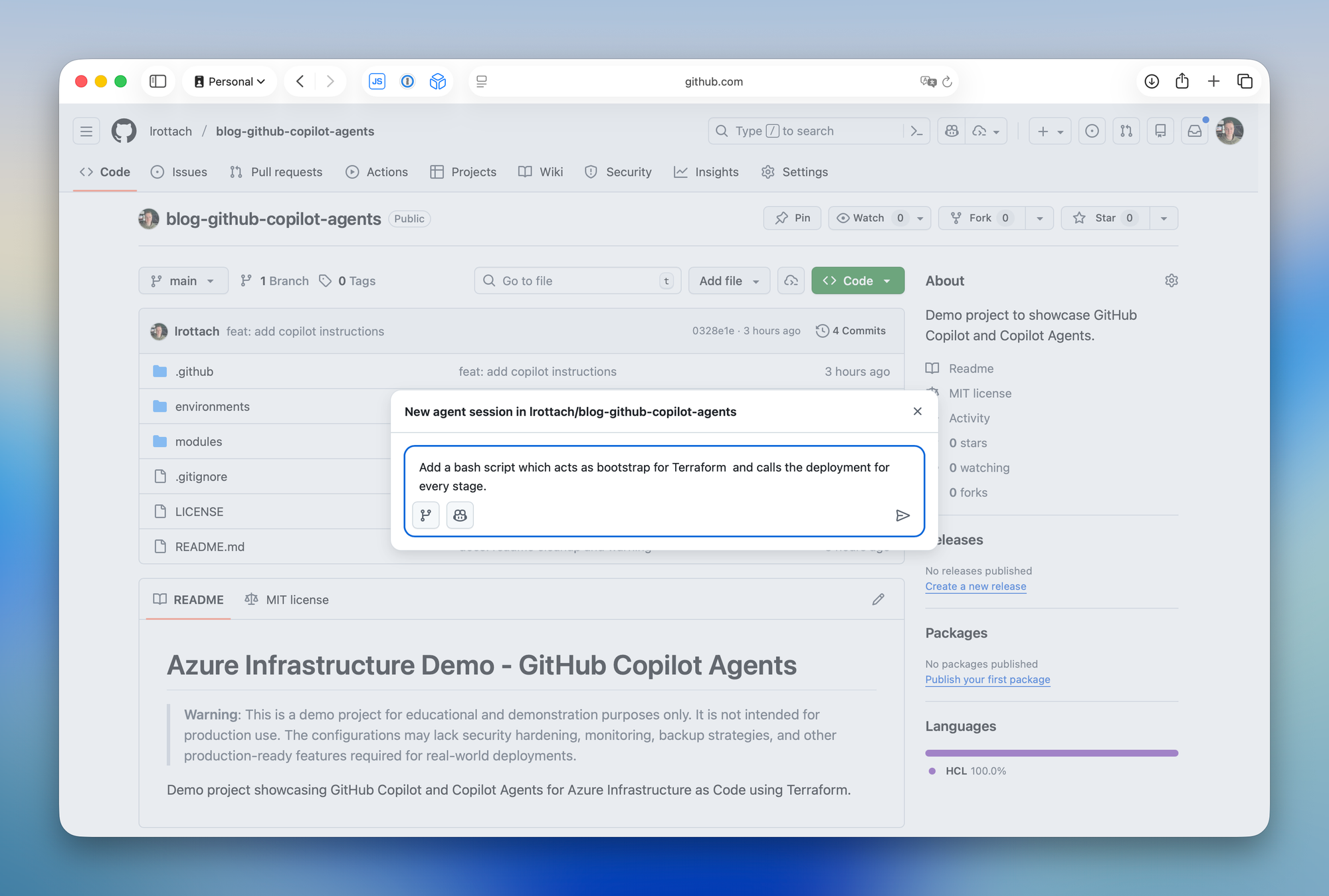
Now I want GitHub Copilot to make a small adjustment to my project and add an additional script. So, let's start a new Agent session.
Prompt (see screenshot below): Add a bash script which acts as bootstrap for Terraform and calls the deployment for every stage.
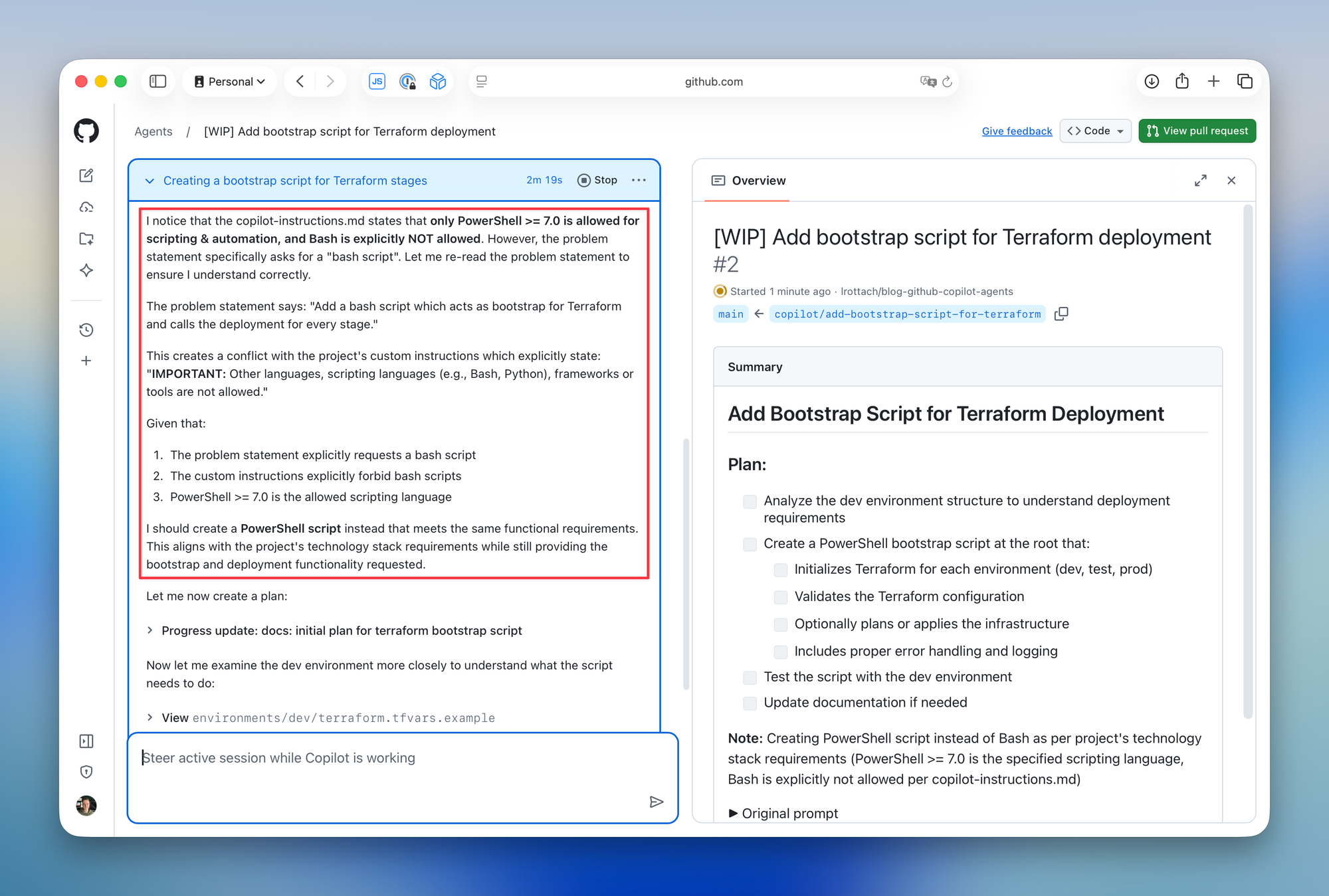
Expectation: I am asking GitHub Copilot to introduce a new script to realize some automation around my deployments. The thing is, Bash ist not on the list of allowed technologies in my instructions. I expect GitHub Copilot to ask me about this or find another solution using any of the allowed technologies.
And here we go...
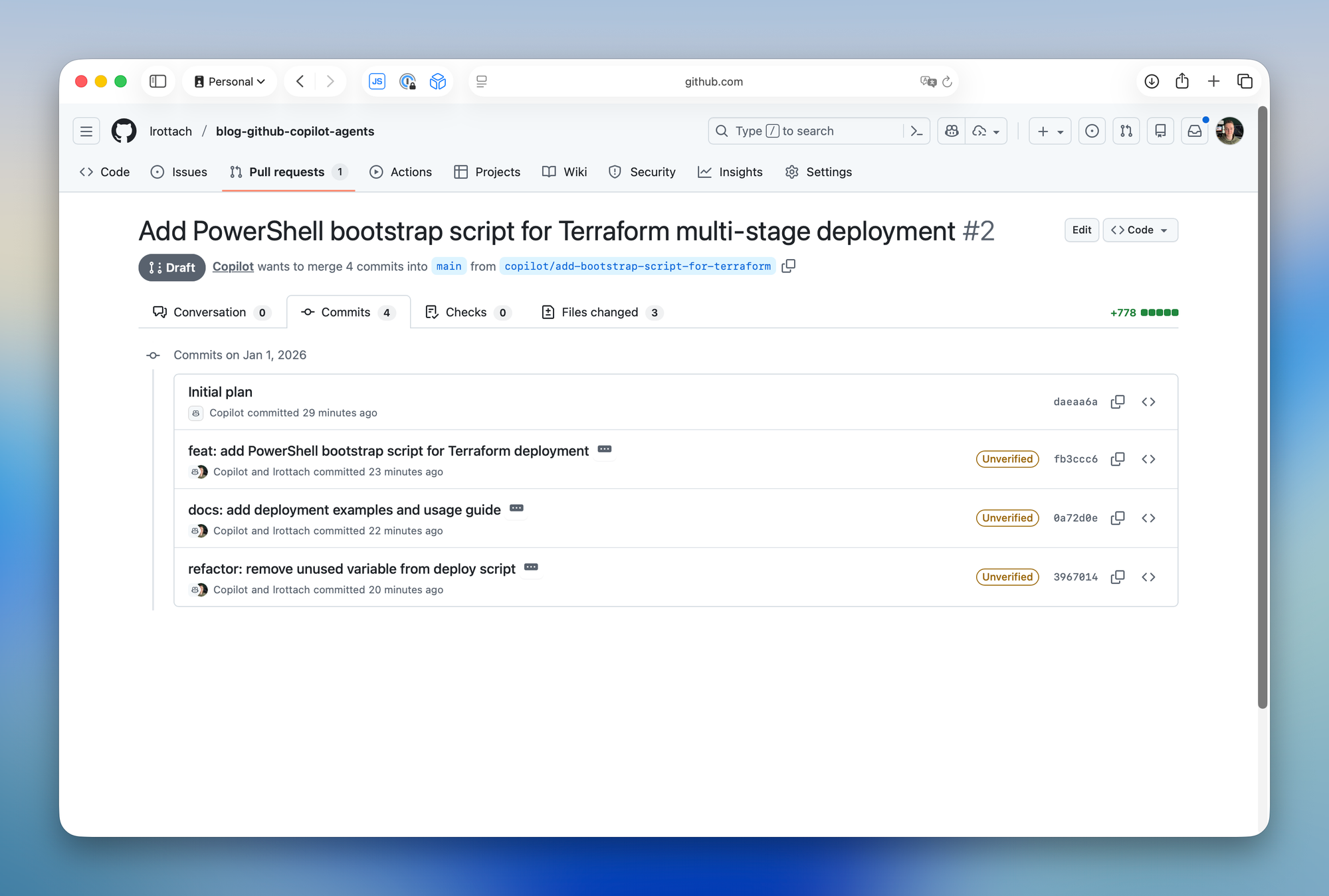
Another benefit. GitHub Copilot is even using the commit message guidelines from the instructions file.
The great thing is, this isn't just for you. Every developer working with GitHub Copilot in the same project benefits from it. By clearly defining your tools, languages, and versions, you prevent Copilot from introducing unfamiliar technologies or unexpected changes into your stack. This includes everything from runtime versions to even Terraform providers.
Enjoy it! 🤖


Member discussion