
Introducing the Cloud Reaper for Azure

A few years ago, while I was studying C# development, I wanted to build something real... not just another classroom exercise, but a project that actually solved a problem I had. I've always been fascinated by serverless tech on Azure, especially Azure Functions and the Durable Task Framework. The concept of Durable Entities as long-lived, stateful objects orchestrated by the runtime, absolutely hooked me. It was quite clunky back in the days, but I genuinely enjoyed figuring it out and building the first version of what would become Cloud Reaper for Azure.
Fun fact: the very first commit on this repo landed on December 31st, 2021, right before I headed out to celebrate New Year's Eve with my friends. Not a bad way to close out the year.
Introduction
Cloud Reaper for Azure is an open-source Azure Functions based engine that automatically deletes resource groups after a defined lifetime. You tag a resource group with a CloudReaperLifetime value in minutes, and Cloud Reaper takes care of the rest. Confirming the schedule, stamping the deletion time, and cleaning up when the clock runs out.
The problem it solves is one I'm sure many of you know: you spin up a resource group for a demo, a workshop, or a quick proof of concept. You tell yourself you'll clean it up later. And then you don't. A few weeks go by, and suddenly your subscription is full of forgotten resources quietly burning through your budget.
Cloud Reaper removes that mental overhead entirely. Tag it, forget it, move on.
Purpose
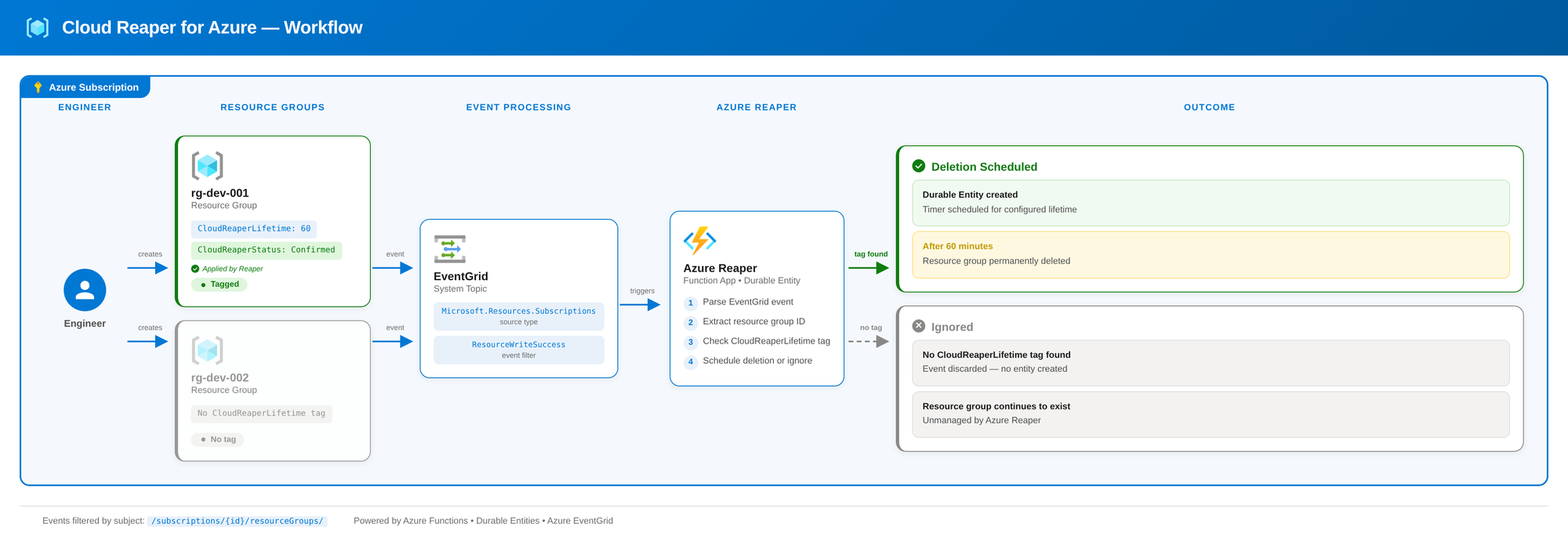
I wanted Cloud Reaper to be fully event-driven from the start. No scheduled polling, no periodic scans across your subscription. Instead, it listens for Azure Event Grid events. Specifically, Microsoft.Resources.ResourceWriteSuccess and reacts the moment a tagged resource group is created or updated. That keeps it lightweight and responsive.
I've been running this solution across all my demo, test, and dev environments for years now. As a Cloud Architect, I constantly deploy resources to demonstrate something to a customer or test a new configuration. Cloud Reaper gives me what I like to call headless mode. I deploy what I need, set a lifetime tag, and never think about it again. No reminders, no cleanup scripts, no surprise invoices at the end of the month.
Technology
Cloud Reaper is built on a few core Azure building blocks.
Azure Functions
Azure Functions is Azure's serverless compute platform. You write focused pieces of code, the platform handles scaling and execution, and you only pay for what runs. Cloud Reaper uses the isolated worker model on .NET 10, which gives me full control over dependencies and middleware.
I really love Azure Functions and preferr them way over Azure Automation Accounts because of it's local development experience and it's deep integration into the Azure ecosystem. You can develop Azure Functions in C#, PowerShell and many more languages.
 ggailey777
Durable Task Framework & Durable Entities
The Durable Task Framework extends Azure Functions with stateful orchestration. Instead of fire-and-forget functions, you get long-running workflows that can wait, retry, and coordinate across multiple steps.
Durable Entities build on top of that. They're long-lived, addressable objects that hold state and respond to operations. Think of them as lightweight actors. In Cloud Reaper, each tracked resource group is represented by its own durable entity that manages the full lifecycle: storing metadata, scheduling the deletion timer, and triggering the cleanup.
hhunter-ms
Azure Event Grid
Event Grid is Azure's managed event routing service. It connects event sources to handlers in a publish-subscribe model with built-in retry logic. Cloud Reaper subscribes to Microsoft.Resources.ResourceWriteSuccess events at the subscription level. Every time a resource group is created or updated, Event Grid fires an event and Cloud Reaper picks it up. This is what makes the whole solution event-driven.
spelluruHow it works
Using Cloud Reaper is straightforward. The entire workflow is driven by tags on your resource groups.
When you create a resource group that you want Cloud Reaper to manage, add a CloudReaperLifetime tag with a value in minutes. For example, a value of 60 means the resource group will be deleted one hour after Cloud Reaper picks it up. As an alternative you just can simply apply that tag to an existing resource group.
Once Event Grid delivers the creation event, Cloud Reaper validates the tag and schedules the deletion. It then applies two additional tags to the resource group: CloudReaperStatus is set to Confirmed, letting you know the resource group has been registered. CloudReaperDeletionTime contains the exact UTC timestamp (ISO 8601) of when the deletion will happen.
When the timer runs out, Cloud Reaper deletes the resource group and everything inside it. No confirmation prompts, no manual steps. That's the whole point.
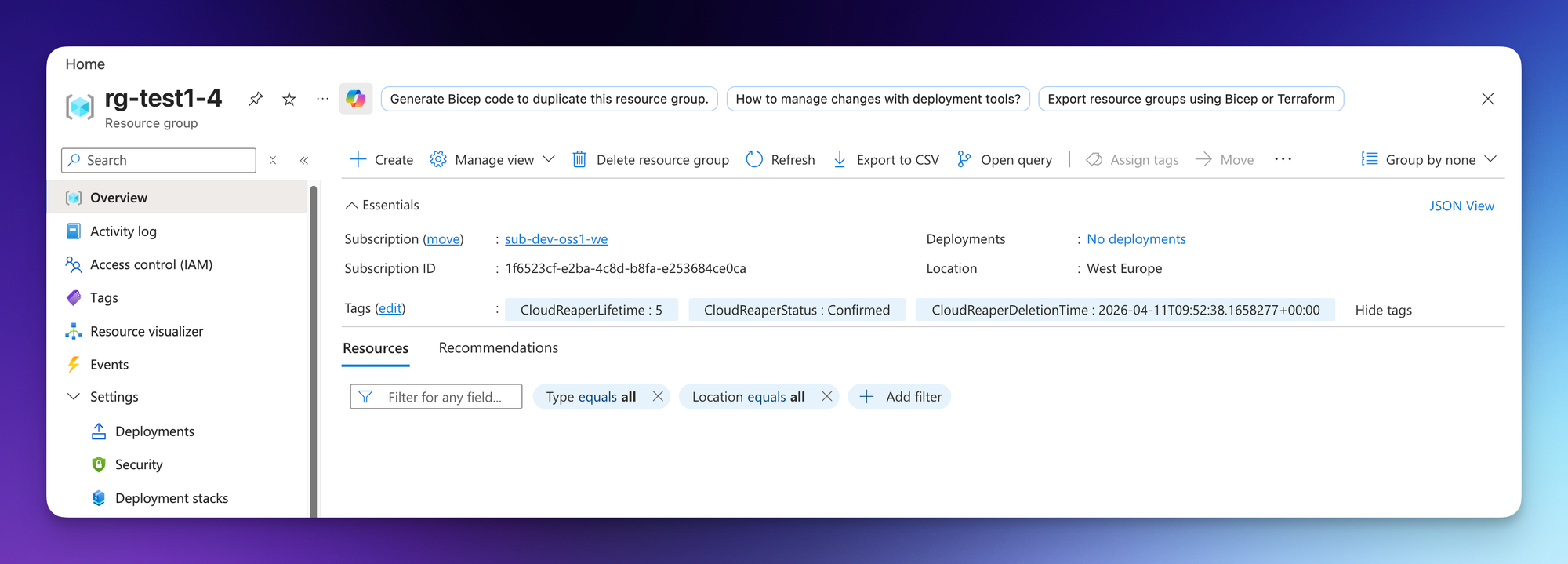
If you change your mind and want to keep a resource group alive, simply remove the CloudReaperLifetime tag. Cloud Reaper will detect the change and unschedule the deletion. For resource groups that should never be touched in the first place, apply a delete lock to protect them.
Whats new
Version 2.0.0 is a complete rewrite of the original codebase. The old version served me well, but it was built on the legacy in-process hosting model and had outgrown its architecture. So I started from scratch.
Here's what changed:
- Isolated worker model. Cloud Reaper now runs on .NET 10 with the Azure Functions isolated worker model, giving full control over the runtime and dependencies.
- One-command deployment. The entire infrastructure and app deployment is handled by a single
azd up. No manual steps, no portal clicking. - Improved documentation. Both the deployment guide and the local development setup have been rewritten from scratch with clear prerequisites and step-by-step instructions.
- Better error handling. The function code is now much more resilient, with proper validation, logging, and graceful handling of edge cases like missing or invalid tags.
- New tags. Cloud Reaper now applies a
CloudReaperDeletionTimetag showing the exact scheduled deletion timestamp, in addition to the existingCloudReaperStatustag. - Cancellation support. Removing the
CloudReaperLifetimetag from a resource group now properly unschedules the deletion, something the old version didn't handle cleanly.
Wrap up
Cloud Reaper for Azure has been my sidekick for years now, quietly cleaning up after my demos and experiments so I don't have to. The v2.0.0 rewrite brings it up to modern standards with .NET 10, the isolated worker model, and a proper deployment story with azd and Terraform.
If you want to dive into the technical details, deploy it to your own subscription, or contribute to the project, check out the GitHub repository. Everything you need is documented there.
And remember: friends don't let friends forget about running resource groups. But if they do, Cloud Reaper has their back.


Member discussion