
Manage your DevOps Agents with Azure Managed DevOps Pools
Running your own build agents used to come with a long list of homework. Scale sets to maintain, custom images to bake, autoscaling rules to babysit, PATs to rotate. Managed DevOps Pools hands most of that back to Microsoft. What's left is the part that actually matters, where your agents run and what they're allowed to touch.
So, what's the deal in general? Why would you wanna use such solutions at all? In my daily work as a Cloud Architect I see the following benefits. Of course, there are a lot more in the area of software development for example.
- Reading and writing Terraform state from a private storage account.
- Calling internal APIs (IP leasing, CMDB integrations, on-prem systems) from a pipeline.
- Reaching Key Vaults, Container Registries, or any PaaS resource locked to a private endpoint.
Overview of Managed DevOps Pools
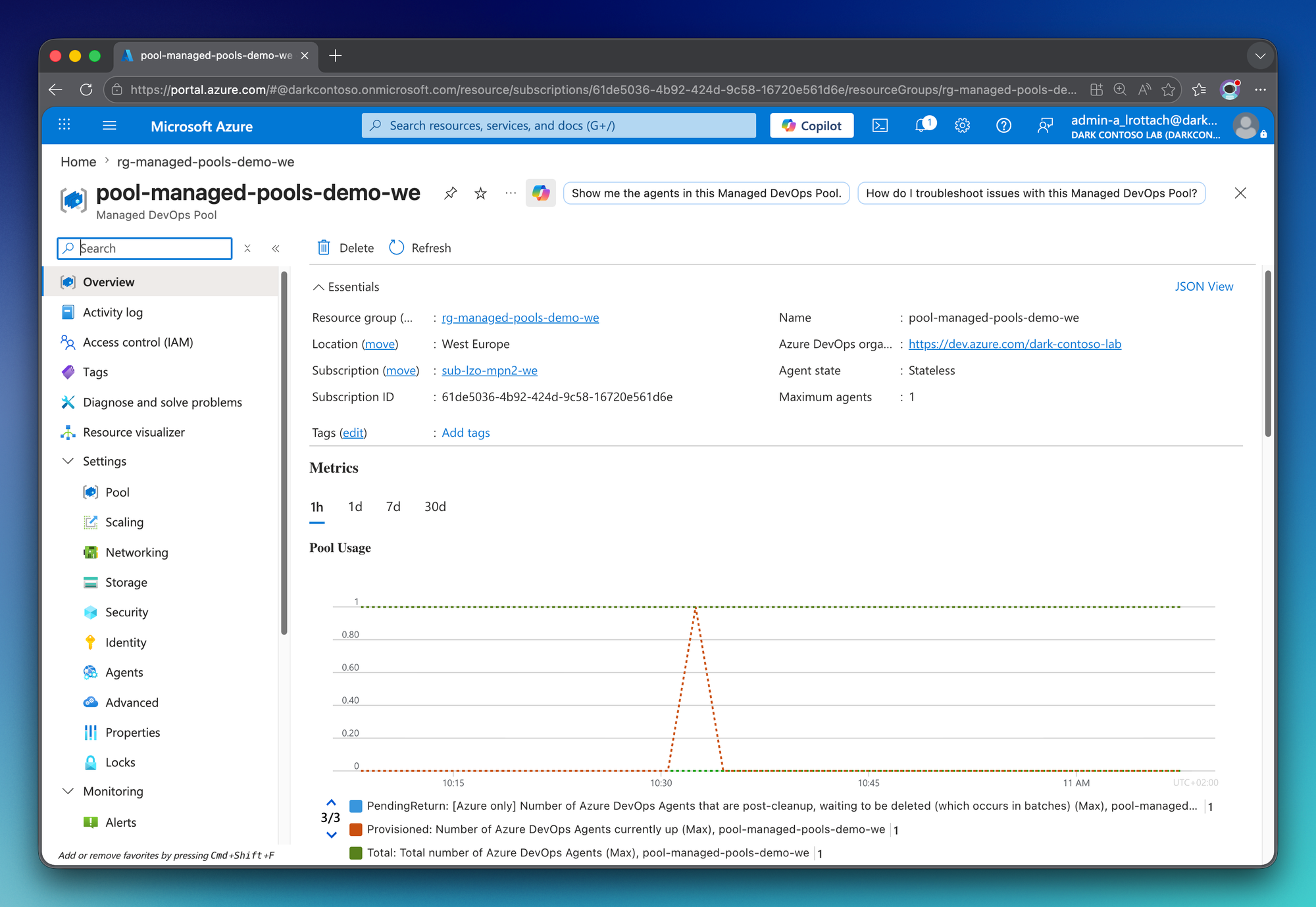
Managed DevOps Pools (MDP) is Microsoft's successor to the self-managed, VMSS-backed Azure DevOps agent pool. Your inputs are minimal. A virtual machine SKU, an image, a subnet, an Azure DevOps organization. Azure handles the rest behind the scenes. VM provisioning, scaling, recycling between jobs, and the registration to your Azure DevOps organization all happen on the service side.
Personal note: This post is a first look. It's not a production blueprint, and it stays small by design. I want to walk you through the architecture I'm using as a playground and demonstrate what makes MDP genuinely useful in customer scenarios. That's private access to your own resources, with no PAT, no shared key, and nothing exposed to the public internet.
The companion code lives on GitHub as blog-managed-pools. Everything you see in this post is in there.
Why not just keep using VMSS agents?
Microsoft clearly positions Managed DevOps Pools as the evolution of the VMSS-backed agent pool. The official guidance is direct. If you're considering an auto-scalable self-hosted pool today, MDP is the recommended starting point.
The shift isn't cosmetic. The agent VMs run in a Microsoft-managed subscription, so VM lifecycle, OS patching, and scale set tuning stop being your problem. MDP also scales per agent instead of in percentage steps, comes with its own dedicated quota, supports thousands of agents per pool, and lets a single pool run multiple images across multiple Azure DevOps organizations. None of that is on the table with scale set agent pools.
VMSS agent pools still work, but they're the legacy path now. With most of the operational burden lifted. What's left for you is the half that actually carries value. You decide what the agents are allowed to reach, and that's the half this post is about.
Architecture
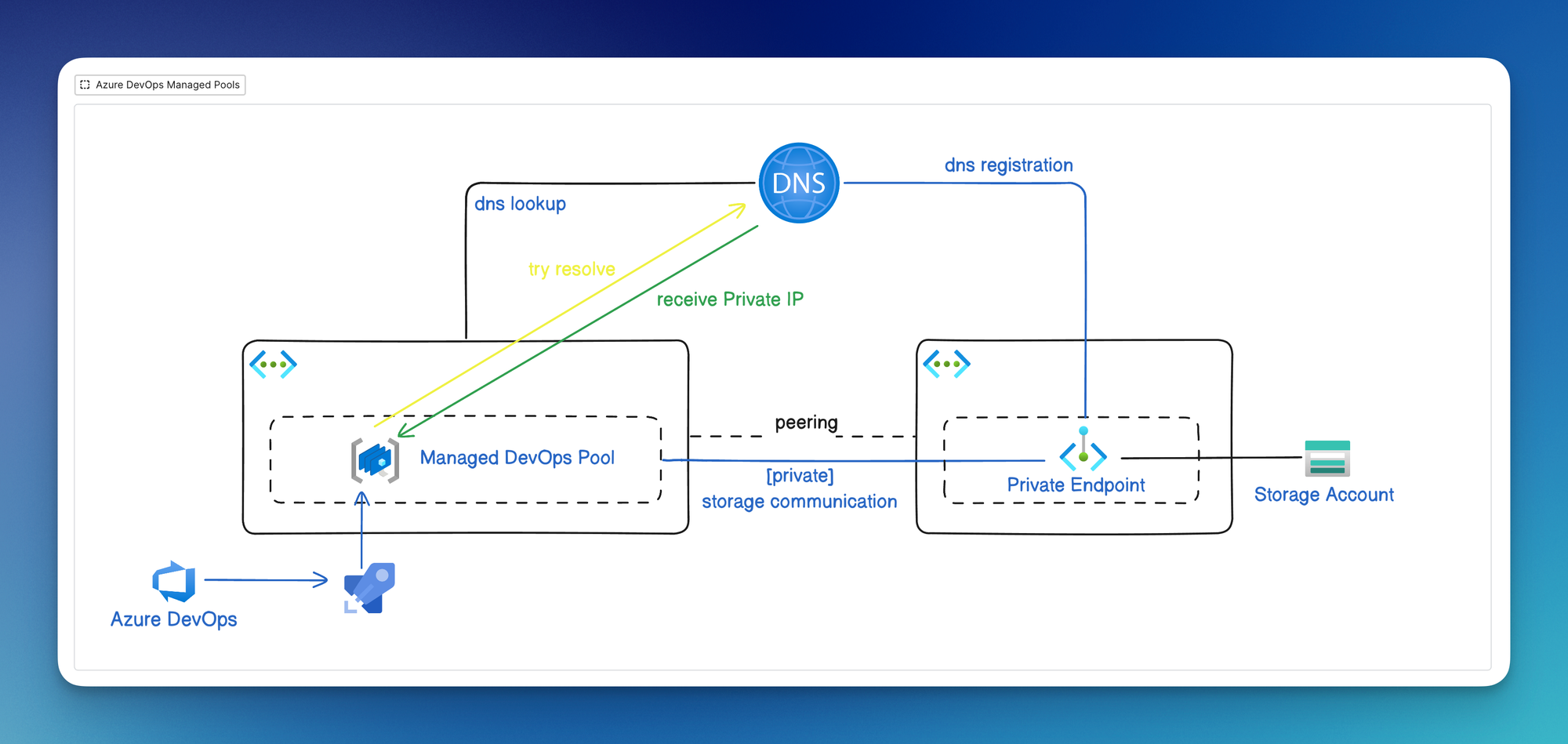
The goal of this demo is simple. Deploy a Managed DevOps Pool that runs inside a customer-owned virtual network, and let it reach a private blob storage account without ever touching the public internet.
That single scenario is the foundation for a lot of real use cases I run into as an architect.
The deployment uses two networks on purpose. The pool network hosts the agent subnet, delegated to Microsoft.DevOpsInfrastructure/pools. A NAT gateway handles outbound egress. The storage network hosts the private endpoint to the blob account. The two are bridged through bidirectional peering and a shared private DNS zone (privatelink.blob.core.windows.net) linked to both.
The user-assigned managed identity attached to the pool is what makes the storage access work. It holds Storage Blob Data Contributor on the storage account to authenticate against the private endpoint. No shared keys, no SAS tokens, no PATs anywhere. A trusted agent, working in a trusted environment.
Deployment
Everything is on GitHub. Here are the pieces that matter most.
The delegated subnet
The pool subnet has to be delegated to the Microsoft.DevOpsInfrastructure/pools service. That delegation is what lets MDP attach and detach VMs without you (or the service) needing direct subnet-level permissions.
resource "azurerm_subnet" "pool" {
  name                            = var.subnet_pool_name
  resource_group_name             = azurerm_resource_group.main.name
  virtual_network_name            = azurerm_virtual_network.main.name
  address_prefixes                = ["10.0.1.0/24"]
  default_outbound_access_enabled = false

  delegation {
    name = "devopsinfrastructure"
    service_delegation {
      name = "Microsoft.DevOpsInfrastructure/pools"
      actions = [
        "Microsoft.Network/virtualNetworks/subnets/join/action"
      ]
    }
  }
}
Note default_outbound_access_enabled = false. Azure's legacy default outbound for VMs is being retired, so the agent VMs need an explicit egress path. That's the NAT gateway sitting right next to this subnet.
First-party service principal
This one trips people up. MDP uses a well-known first-party service principal called DevOpsInfrastructure to manage resources on its side. You need to grant it Reader and Network Contributor on the pool virtual network so it can attach VMs to the delegated subnet.
data "azuread_service_principal" "devopsinfrastructure" {
  client_id = "31687f79-5e43-4c1e-8c63-d9f4bff5cf8b"
}

resource "azurerm_role_assignment" "devopsinfrastructure_network" {
  for_each = toset(["Reader", "Network Contributor"])

  scope                = azurerm_virtual_network.main.id
  role_definition_name = each.value
  principal_id         = data.azuread_service_principal.devopsinfrastructure.object_id
}
The client ID 31687f79-5e43-4c1e-8c63-d9f4bff5cf8b is the same in every Entra tenant. Looking it up by application ID is what makes this snippet portable across subscriptions.
Managed DevOps Pool
resource "azurerm_managed_devops_pool" "pool" {
  name                  = var.pool_name
  resource_group_name   = azurerm_resource_group.main.name
  location              = azurerm_resource_group.main.location
  dev_center_project_id = azurerm_dev_center_project.main.id
  maximum_concurrency   = 1

  identity {
    type         = "UserAssigned"
    identity_ids = [azurerm_user_assigned_identity.pool.id]
  }

  azure_devops_organization {
    organization {
      url         = var.azure_devops_organization_url
      parallelism = 1
      projects    = var.azure_devops_projects
    }
  }

  stateless_agent {}

  virtual_machine_scale_set_fabric {
    sku_name  = "Standard_B2s_v2"
    subnet_id = azurerm_subnet.pool.id

    image {
      well_known_image_name = "ubuntu-24.04-g2"
    }
  }
}
A few things worth pointing out:
stateless_agent {}means every VM is destroyed after each job. Swap this for astateful_agent { ... }block to keep agents alive between jobs. Stateful is useful when pipelines benefit from a warm cache (Docker layers, package downloads, repo clones).- The Azure DevOps connection is implicit. As long as the organization sits in the same Entra tenant as the subscription, MDP authenticates itself. No PAT, no app installation.
well_known_image_namepicks from a curated Microsoft-managed image list. You can also bring your own image from a Compute Gallery if you need a customized one.
0 cores on the MDP side for every family, so check (and request) quota before your first apply. The README in the repo has the exact az rest call I use.Private Endpoint and DNS
The storage side is standard private endpoint plumbing, with one detail worth highlighting. The private DNS zone (privatelink.blob.core.windows.net) is linked to the Azure Virtual Network hosting the DevOps Managed Pool. Without the link on the pool VNET, the agent would resolve the public Azure IP and hit the closed door of public_network_access_enabled = false.
resource "azurerm_private_dns_zone_virtual_network_link" "pool" {
  name                  = var.private_dns_zone_link_pool_name
  resource_group_name   = azurerm_resource_group.main.name
  private_dns_zone_name = azurerm_private_dns_zone.blob.name
  virtual_network_id    = azurerm_virtual_network.main.id
}
Linking the zone handles name resolution. VNET peering handles the route. Both are required. Either one alone won't work.
Managing identity
resource "azurerm_role_assignment" "pool_identity_storage_blob" {
  scope                = azurerm_storage_account.main.id
  role_definition_name = "Storage Blob Data Contributor"
  principal_id         = azurerm_user_assigned_identity.pool.principal_id
}
That's the line that closes the loop. Inside a pipeline running on this pool works straight through the private endpoint. Full audit trail, no secrets, no key rotation.
Run this thing
First we need to make sure the pipeline runs on our newly deployed managed pool.
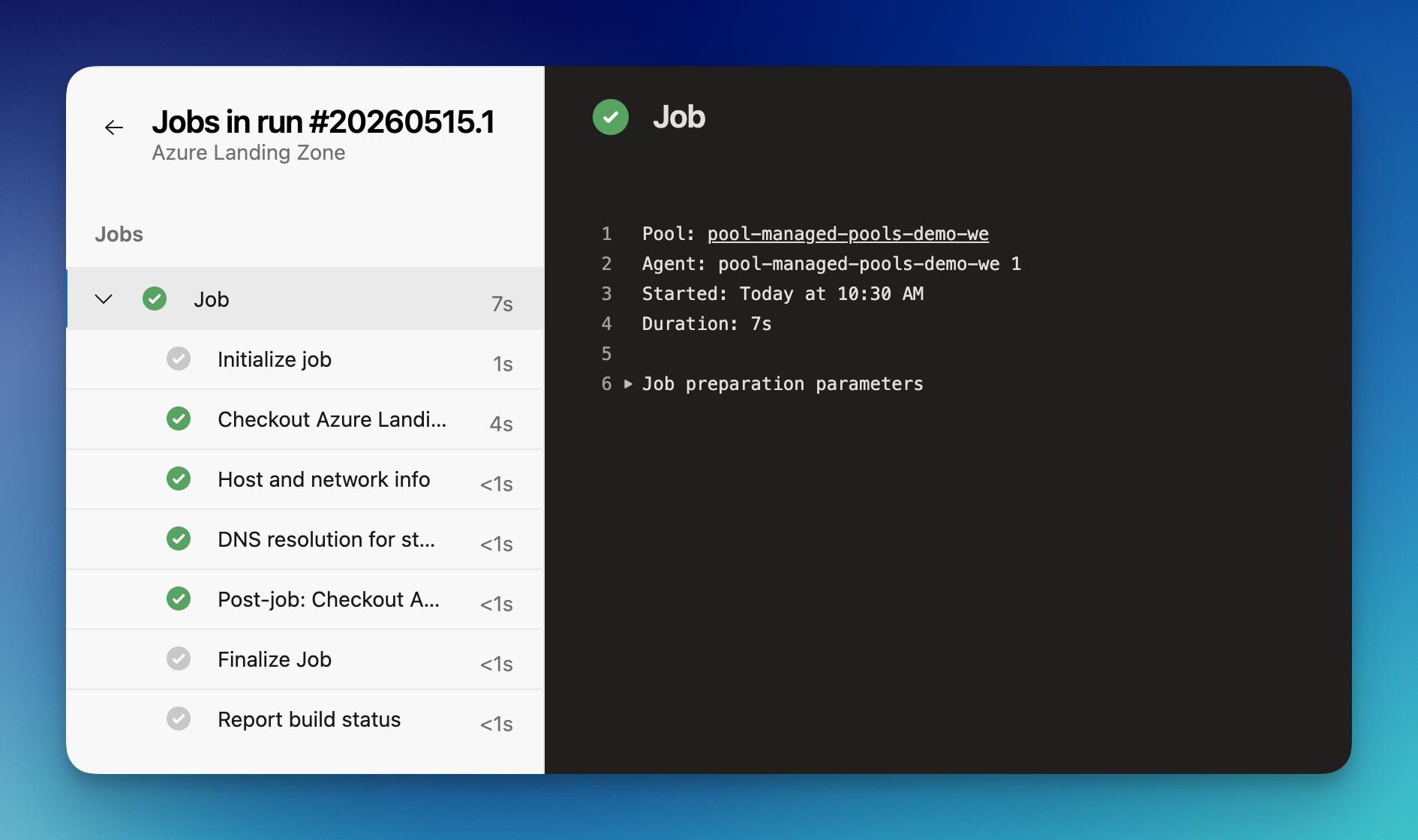
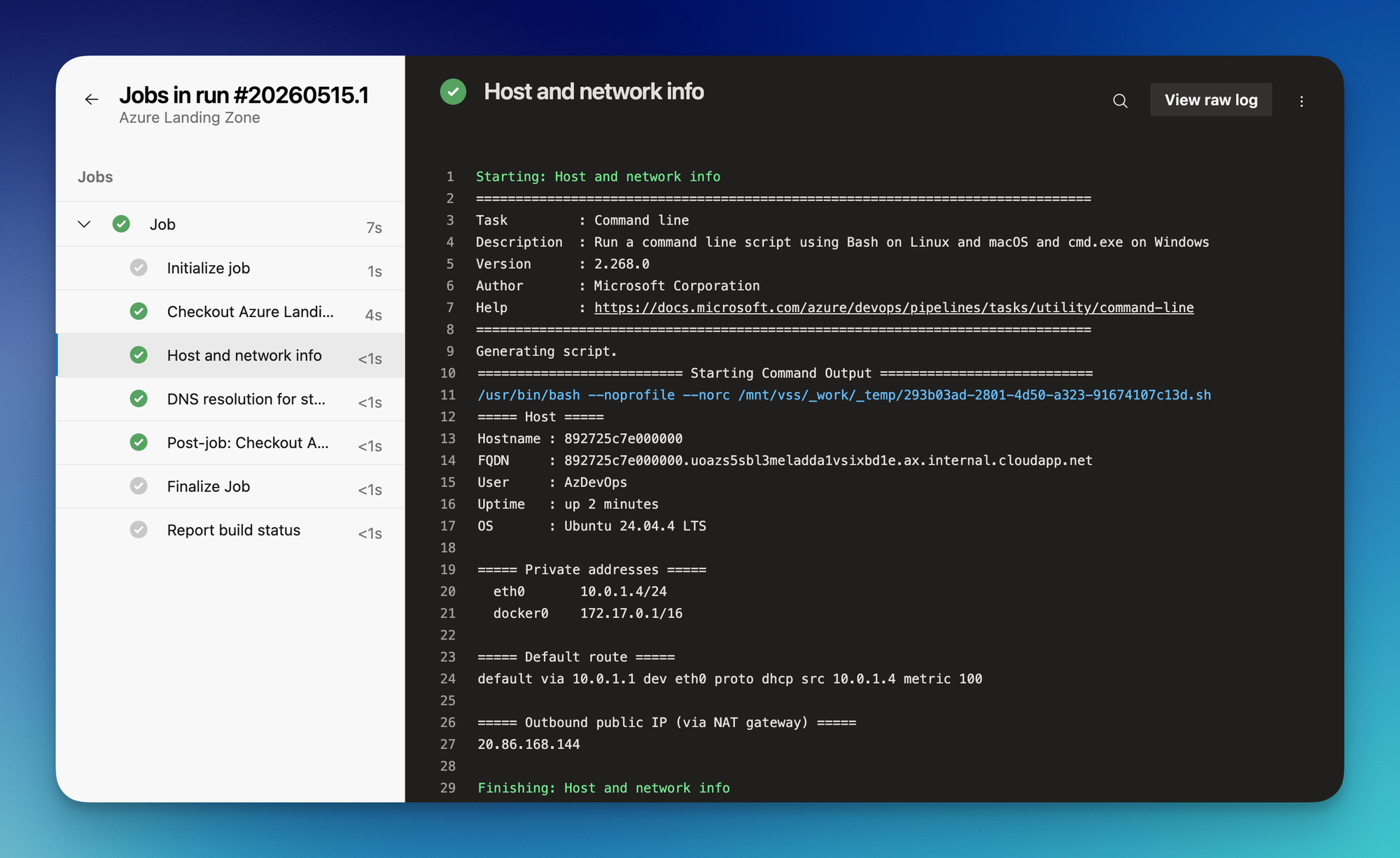
I've designed this pipeline to print out some basic information about the agent this pipeline is running on. Here we can see the host, operating system and the IP address from our self-hosted Azure Virtual Network. Also, we can verify the public IP from our NAT gateway which is used as outbreak to the internet.
In the second step we can verify, the Azure Storage Account is resolving without any issues into a private IP address from our self-hosted network.
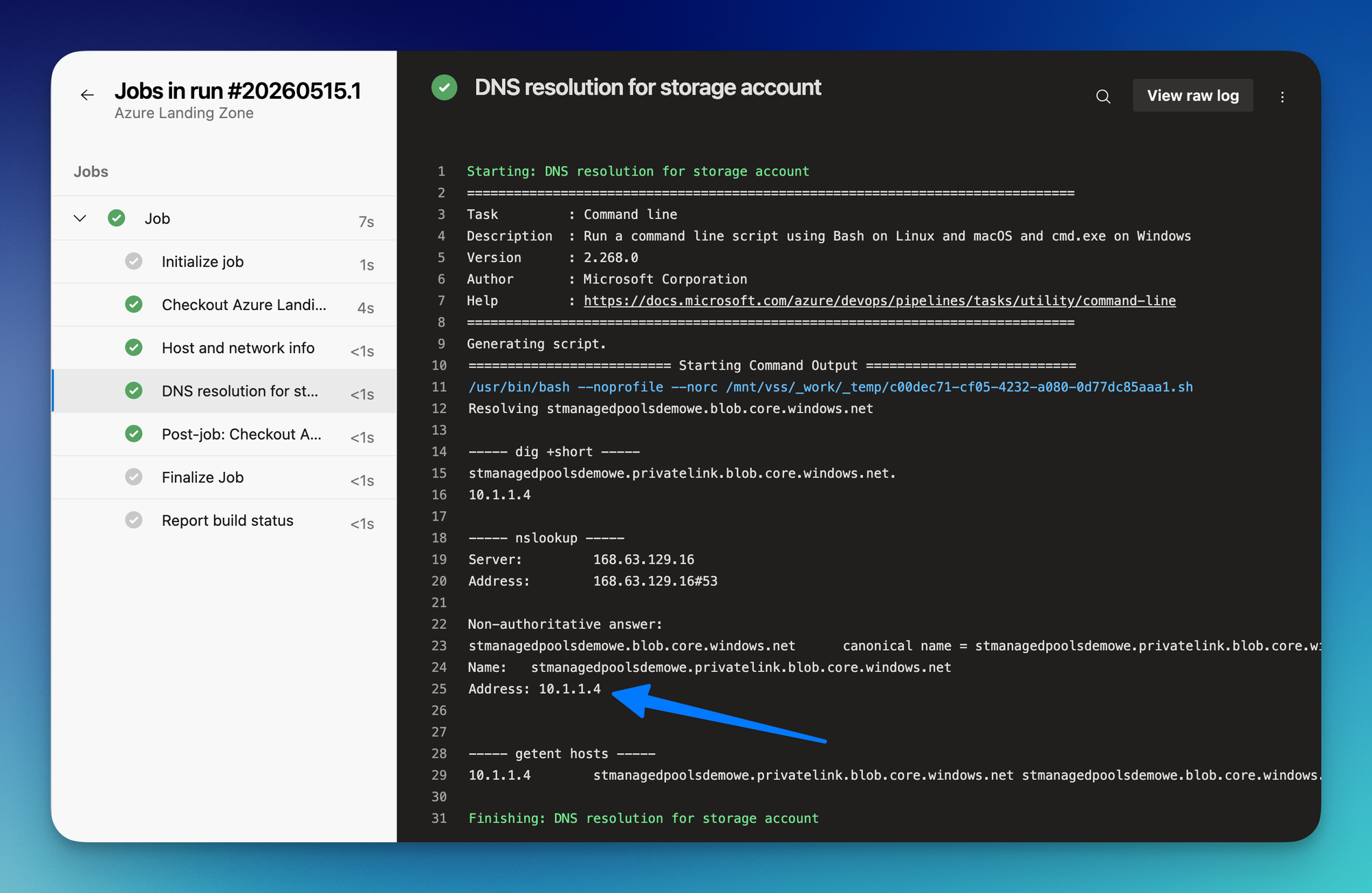
That's it. Another resource not haning around the internet to make our day better and more secure. Now we are ready to securely access that storage account for assets, state and more.
What's next
The MDP team is shipping features at a good pace. The features timeline is worth bookmarking. A few things I'm actively watching:
- GitHub Actions runners on top of MDP. The API specs are already there, the official docs are not. Same security model, same network integration, but for GitHub-hosted workloads. This is the one I'm most curious about, and probably the next big unlock for platform teams that run both Azure DevOps and GitHub side by side.
- Container agents: Provisioning of a simple container and then starting the agent inside of it
- More mature stateful agent controls: Stateful pools work, but I'd like to see better defaults around eviction, cache reuse, and lifecycle.
Personal Opinion
Managed DevOps Pools is the right default for new Azure DevOps agent infrastructure in 2026. The operational savings alone justify the switch from VMSS-based agents, but what I value most is the security posture. Agents running in your VNet, authenticated through a managed identity, reaching private resources without ever needing a secret.
In my day-to-day work, I'm recommending MDP for any customer environment where pipelines need to deploy into private networks or pull from private artifacts. That covers most landing zone deployments, internal platform engineering pipelines, and anything that involves Terraform state in a locked-down storage account. The first time you remove a PAT from a pipeline and replace it with a managed identity, you'll wonder why you waited.
If you're still on VMSS-backed agents, this is a good moment to plan the migration. The Azure DevOps task surface is identical. The only thing that changes is everything underneath, and most of it changes in your favor.
Cheers! 🍹

Member discussion